GeekyFaust | Tech News & Reviews Philippines

Technology News and Reviews Philippines

  • Home
  • About
    • Contact Us
  • Blogs
  • Tech
    • How To’s
    • Reviews
    • Gaming
    • Guides
    • Editorial
    • Telecoms
    • Software
  • Gadgets
    • Laptops
    • Mobile
    • Hardware
You are here: Home / News / Annoying Globe Toolbar Part 2

Annoying Globe Toolbar Part 2

March 3, 2013 By Faust Principe 4 Comments

Like0 Facebook0 Tweet0 Email0

A few days ago my Globe Internet Postpaid Plan went dead, the signal was lost, internet surfing gone! On the second day I went to Abreeza Mall and went to Globe Outlet and have my sim checked – the account is still active, the customer representative checked both my sim and usb broadband stick and found out the the sim is broke probably of long use – they replaced it with a new one and informed me that the sim will be live after an hour.

Arrived home checked out the internet connection and it all went fine, on the first browser use, annoying popup came out of nowhere, impressing subscribers on its new deals and features.
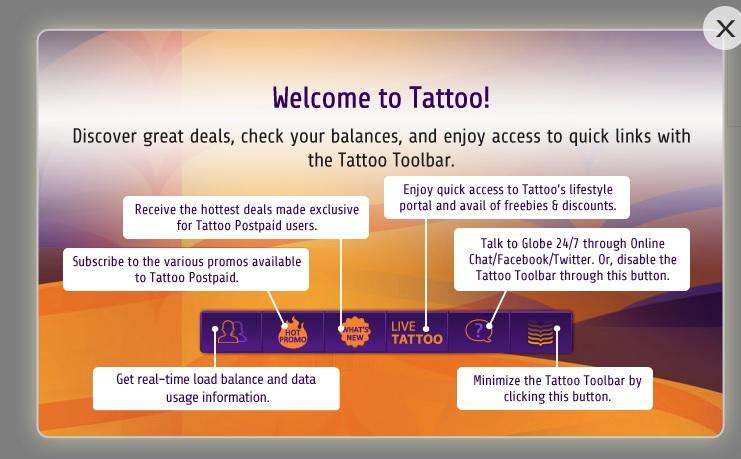
globe-tattoo-welcom-screen

Refreshing the page further – I got this one and it’s hanging at the lower right of the browser screen – in purple color.
globe-tattoo-screen

I got this annoying Globe Toolbar back then in 2012 and now it’s back again in 2013. Do you know how to get rid of this? fire up the comments below.

Share this:

  • Facebook
  • X

Related

Like0 Facebook0 Tweet0 Email0

Filed Under: News Tagged With: Globe Broadband Internet, Globe Internet, Globe Tattoo

About Faust Principe

Faust is the author and founder of GeekyFaust. You can follow him at facebook.com/geekyfaust don't forget to like and share!

Comments

  1. Anonymous says

    April 5, 2013 at 4:44 pm

    Install AdBlock extension in your browser. Right-click the Globe Toolbar and AdBlock it. Presto! 😀

    Reply
    • Faust Principe says

      April 5, 2013 at 9:03 pm

      Why did not I think of that earlier? Thanks for the heads up!

      Reply
      • Anonymous says

        April 7, 2013 at 12:19 pm

        You’re welcome.

        Reply
  2. NBC says

    May 21, 2013 at 3:44 pm

    You can unsubscribe from the help button

    Reply

This site uses Akismet to reduce spam. Learn how your comment data is processed.

Recent Stories

Crafting Effective Oil Trader Strategies with Options Skew

Yield Farming and Stablecoin Pools: The Bitcoin-ACryptoS Connection

Bingo Rules You Need To Know

The Effects of Technology Advancement to PH Gambling Scene

The Future of Payments – How Digital Currencies Are Transforming the Industry

GeekyFaust is a site for technology news, gadgets, and reviews. We provide technical information for non-techies and techies alike. Established on June 16, 2009.

LATEST TECH STORIES

Oppo Top Stories
Telco Top Stories
Xiaomi Top Stories
Epson Top Stories
Secretlab Top Stories
Lenovo Top Stories
Android Top Stories

POPULAR TOPICS

Mobile Phone / Smartphone
Latest News
Tech Reviews
How To's
Guides
Tech Gadgets
Local Telco
Computer Hardware
Software & Apps
Gaming

TRENDING POST

How to activate and register DITO SIM
How to apply for BDO Teacher Salary Loan
How to register and activate Veterans Bank ATM Online Banking
How to apply for Teacher Loans at China Bank Savings
PS Bank Online E-Banking
UnionBank Send and Receive Funds Online
How to apply for a EastWest Bank Teacher Loan

TOP MOBILE BRANDS

Asus AOC Black Shark Epson Fujitsu Sony Xiaomi Apple Nokia Cherry Mobile Oppo ZTE MyPhone Cloudfone Lenovo Samsung Secretlab Motorola Huawei LG Xperia MediaTek Vivo Klevv

Copyright © 2023 GeekyFaust Back To Top Disclosure Privacy Policy Reviews Policy Sitemap Facebook Twitter LinkedIn
Share this ArticleLike this article? Email it to a friend!

Email sent!